What Help Should You Expect When Switching AI Providers?
Define AI API onboarding support: who handles access, compatibility, testing and handover, and which implementation work remains with your team.
ENTERPRISE AI · ONBOARDING SUPPORT
Expect only the onboarding work that the supplier has explicitly agreed to deliver. Ask who handles access, compatibility questions, testing, capacity requests and escalation, and what evidence closes each step. API documentation or a support contact does not automatically include application development, production migration or ongoing managed operations.
For an enterprise buyer, “we will help you integrate” leaves several important questions unanswered. Will someone explain the endpoint, inspect a failing request, change application code, or stay involved through launch? Those are different services, with different owners and completion criteria.
Scope: This article proposes an onboarding responsibility checklist, not a promise of included Token360 services. Public sources were checked November 17, 2026. Availability, charges, working hours and contractual support commitments must be confirmed for the engagement.
What is the difference between support and implementation?
Support helps resolve questions or problems within a service's scope. Implementation builds or changes the customer's working integration. A supplier may offer both, one or neither beyond documentation. Ask for deliverables and ownership rather than relying on labels such as onboarding, technical assistance or enterprise support.
Type of help
Example deliverable
Boundary to confirm
Documentation
Endpoint, authentication and request examples
Whether examples cover the exact model and features you need
Integration guidance
Review of request structure or supported parameters
Whether the supplier will inspect your application code
Troubleshooting
Investigation of a reproducible failing request
Evidence required, escalation path and response coverage
Implementation
Changes to your application's adapter or workflow
Who writes, tests, maintains and approves the code
Managed operations
Ongoing monitoring and incident handling
Hours, responsibility boundaries and agreed service levels
A dedicated contact can coordinate work without owning every technical task. Likewise, a supplier may provide useful troubleshooting while your team remains responsible for frontend behavior, business rules and downstream systems. Make these boundaries visible before assigning a launch date.
Does a compatible SDK make onboarding automatic?
No. A familiar SDK can reduce initial integration work, but it does not prove that every parameter, stream event, tool response or media lifecycle matches your application. Ask the supplier to confirm supported features and known differences, then test the application paths that actually use them.
For example, OpenRouter's SDK documentation shows configuring a base URL, credentials and a model request. That establishes a documented integration pattern, not a complete migration acceptance test. Similarly, fal's quickstart helps developers obtain access and make a model call; the surrounding product workflow remains a separate concern.
Your team should inventory the features it relies on and bring the unresolved items to onboarding. The Token360 migration checks address technical validation. This article assigns the work: which checks your team executes, which questions the supplier answers, and who accepts remaining differences.
Which responsibilities should be agreed before work starts?
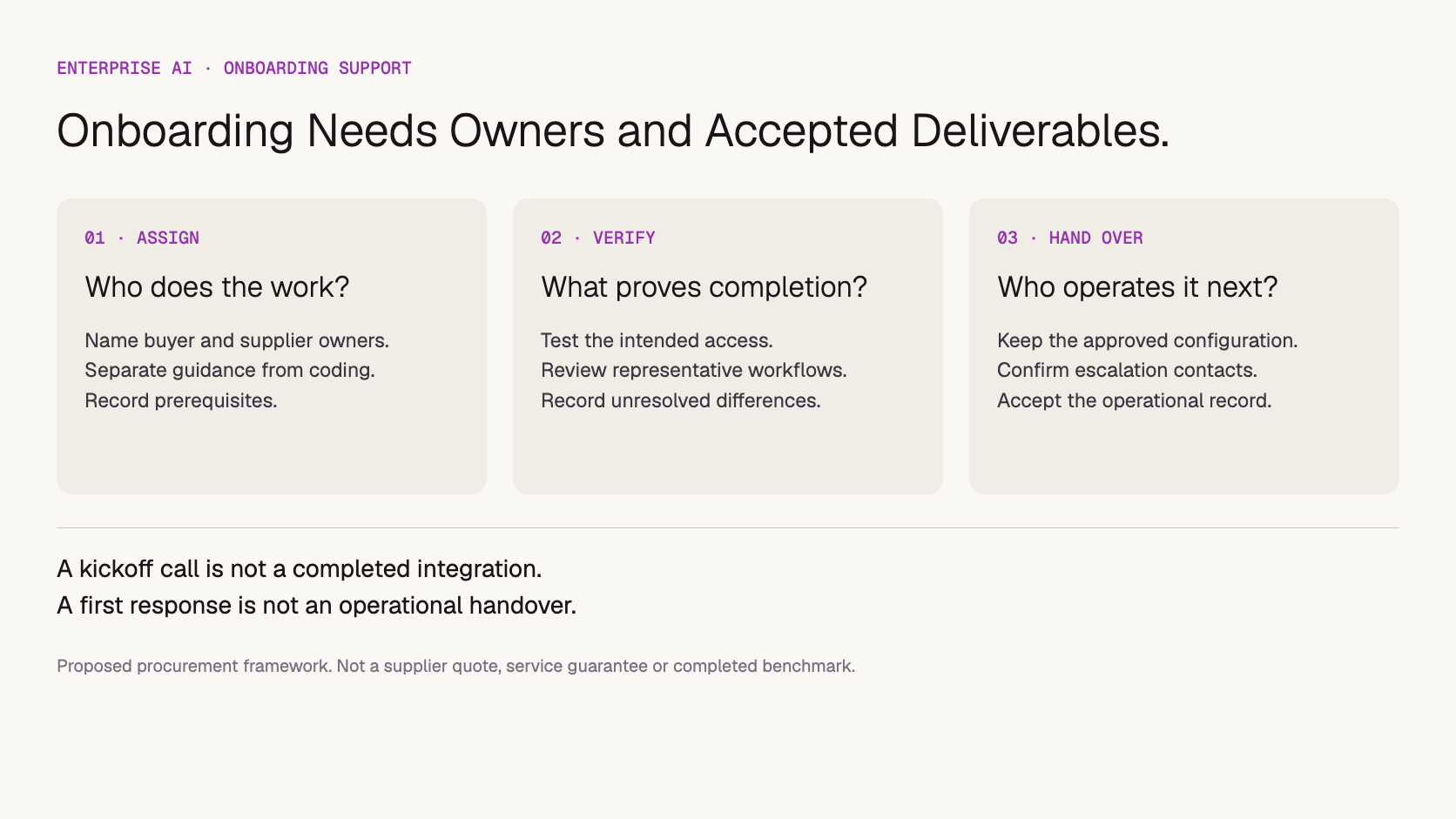
Assign a named owner to each onboarding workstream and identify what the other side must provide. Start with account access, application compatibility, test data, usage controls and operational handover. Avoid a plan in which both parties are “supporting” a task but neither is responsible for completing it.
Workstream
Buyer responsibility to assign
Supplier contribution to confirm
Account and credentials
Choose owners and protect secrets
Explain access setup and resolve account-side blockers
Request compatibility
Inventory features and run application tests
Confirm service behavior and investigate supported-path failures
Output acceptance
Define the business rubric and reviewers
Clarify model/configuration choices and service limits
Usage and capacity
Provide demand assumptions and control traffic
Confirm quotas, requested changes and agreed arrangements
Security and procurement
Approve permitted data and internal requirements
Provide applicable documents and answer scoped questions
Launch and handover
Approve release, monitoring and rollback
Confirm contact routes and any agreed launch assistance
This is a proposed responsibility split, not a universal contract. A managed implementation may allocate work differently. The point is to make the allocation explicit and to ensure that the people accepting it have authority to commit their teams.
What should you send to get useful technical help?
Provide the smallest reproducible example, the expected behavior, the observed result and the relevant service identifiers. Remove credentials and unnecessary customer data. Include the endpoint, model, parameters, timestamps and request identifiers where available so the supplier can investigate the specific failure instead of guessing from a screenshot.
Describe the business impact separately from the technical symptom. “This response is empty” and “our export workflow cannot finish” are related but different facts. A clear incident packet helps the supplier inspect the service while your application owner checks downstream handling.
For asynchronous media, identify whether the issue concerns submission, job completion or downloading the output. For a stream, note whether the failure occurs before any content or after partial output. The reproducible API bug report guide provides the detailed evidence format.
Never send an API key in a support example. If live investigation requires access to a system, use the organization's approved access process and agree its scope. Onboarding convenience should not turn into unmanaged production access.
How should milestones and acceptance work?
Use milestones that demonstrate a working capability, not just completed meetings. Agree the evidence needed for account readiness, representative workflow success and operational handover. Separate supplier blockers from buyer dependencies. A launch date should reflect unresolved work on both sides rather than assuming a kickoff call guarantees readiness.
A hypothetical onboarding plan might include these checkpoints:
Access ready: the intended account and models are available, and a controlled request succeeds.
Workflow verified: the buyer's representative application cases pass the agreed review, with exceptions recorded.
Operations ready: budget controls, monitoring ownership and escalation contacts are documented.
Handover accepted: the buyer can operate the integration and knows which issues remain open.
These are suggested checkpoints, not a Token360 timetable. Do not invent a fixed onboarding duration when it depends on security review, network access, application changes or model availability. Ask which prerequisites must be complete before any supplier delivery clock starts.
Define who delivers the work and how the receiving team knows it is complete.
What support remains after the first successful request?
Confirm the ongoing route for incidents, usage changes and model questions before onboarding closes. Record contact methods, covered hours, escalation criteria and any agreed response commitments. An initial integration session does not establish continuous launch support, a resolution deadline or responsibility for failures in the buyer's application.
Response time, investigation progress and resolution time are different commitments. A supplier may acknowledge a problem quickly while still needing a reproducible case or upstream investigation. Use the API SLA checklist for the contractual detail rather than treating informal onboarding messages as service levels.
Keep a short handover record: production configuration, approved exceptions, account owners, test evidence, support route and open issues. If a workflow remains blocked, name the next action and owner. “Onboarding complete” should not conceal unresolved behavior the business still depends on.
What can you ask Token360 to include?
Bring the integration scope and ask which assistance can be included, which needs separate agreement and which stays with your team. Specify the models, application features, expected traffic and launch dependencies. Ask for a written responsibility record rather than assuming that enterprise model access includes a fully managed migration.
Token360 focuses on enterprise access across text, image, audio and video. Its enterprise page lists support and scale discussions, with some items marked Contact Sales or roadmap. Confirm the current scope; do not read those labels as automatic entitlements.
Ask specifically who answers compatibility questions, who investigates request failures, whether launch assistance is available, and what deliverables are included in the quote. If you need someone to modify your application, say so explicitly. Guidance and implementation should not be confused simply because both are technical work.
Frequently asked questions
Should the supplier write our integration code?
Only if implementation is included in the agreed scope. Otherwise, assign that work to your team or implementation partner and ask the supplier to clarify supported service behavior.
Does a named account contact guarantee technical coverage?
No. Confirm which technical team handles issues, how to reach it and what coverage has actually been agreed.
Is the first successful request the end of onboarding?
It proves one access path. Representative workflow tests and operational handover still need to be completed for the intended rollout.
Can we stop the old supplier as soon as access works?
Do not use basic connectivity alone as the decision. Follow your migration and rollback plan, including active jobs and stored state, before retiring the previous service.
Enterprise AI
API
Bring your next idea to life.
Create a video scene in Creator, or explore models for images, audio, and text to find the right capabilities for your project.


 Guides
 Guides
 Guides