Do Separate AI API Keys Isolate Staging and Production?
Separate API keys do not isolate every shared resource. Check staging and production boundaries for funds, capacity, secrets and output destinations.
ENVIRONMENT DESIGN · STAGING & PRODUCTION · BLOG 175
By Yuki Yu · Documentation checked November 6, 2026
Separate AI API keys help identify and control staging and production traffic, but do not automatically isolate every resource they use. The environments may still share account funds, capacity constraints or administrative policies. Define the boundary you need, then verify which controls enforce it rather than treating a key name as proof.
OpenRouter’s team-access FAQ leads to organization management and shared resources. That raises a practical deployment question for an enterprise AI application: can a staging mistake affect production even when the two environments use different credentials?
This is a documentation-based design review for teams integrating Token360. The example configuration and acceptance checks are proposed application practices, not results from a live isolation test. No account was stress-tested, and no claim of dedicated infrastructure or independently reserved capacity is made.
What does environment isolation actually mean for an AI API?
Environment isolation means a particular staging action cannot cross a defined production boundary. That could mean reading a production secret, consuming reserved capacity, writing a production result or changing a production policy. These are different guarantees. State the unwanted effect first, then identify the control and evidence needed to prevent it.
Boundary
Question to answer
Evidence to look for
Credential access
Can the staging runtime obtain the production secret?
Secret-manager permissions and deployment identity
Spending
Can staging exhaust funds needed by production?
Key controls plus the scope of shared funds and account stops
Capacity
Can test traffic consume a limit production also uses?
Documented limit scope or a confirmed capacity allocation
Data and destinations
Can a test write into a live store or callback?
Storage, database and endpoint authorization
Administration
Can a staging operator change production policy?
Effective management permissions and approval process
“Production is isolated” is too broad to sign off without this breakdown. A team might have separate secret access while intentionally sharing a prepaid account. That can be a valid design, provided the shared dependency is explicit and its failure consequence is accepted.
What do separate keys and workspaces establish?
Separate keys provide distinct credentials; a workspace adds whatever organization and enforcement the service documents. Neither term has an identical meaning across providers. Use separate credentials for deployed services, but check whether workspace membership also controls resources, limits or visibility before treating it as a complete security or availability boundary.
As checked on November 6, 2026, Token360’s guide recommends development, staging and production workspaces and separate service keys. It describes workspace labels for usage and audit clarity. That supports environment organization; the label alone does not establish an independent funding pool or dedicated capacity.
Provider terminology is not portable. For example, Mistral’s key documentation ties a key to its workspace’s quota, limits and resources. OpenRouter’s organization guide describes centralized key management alongside a shared organization credit pool. Check the actual contract of the platform being integrated rather than importing either provider’s semantics into Token360.
A useful naming scheme is environment / service / owner, such as staging / catalog-summary / content-platform. Treat this as an operational label, not a permission rule. Enforce access through the deployment identity and the relevant service controls.
Can staging still affect production spending or capacity?
Yes, if the environments depend on a shared limit or funding boundary. A cap on one key can reduce that key’s allowed usage without reserving anything for another key. Map both local and account-wide controls, then check which failure conditions stop staging alone and which can stop production too.
Token360 documents that key limits are evaluated alongside account balance, credit and account-level spend protection. Its limit guidance also distinguishes requests, token throughput, concurrency and upstream capacity. Applicable values depend on configuration and commercial terms. A second key is not evidence of a second independent capacity allocation.
Consider a constructed deployment: a staging evaluation and a production chat service use different keys but the same spendable account funds. A staging key cap bounds its own permitted spending; it does not earmark funds for the chat service. Other keys and account-wide controls still matter. This is a dependency example, not a report of a Token360 incident.
Write down what production must retain during a staging run: an approved spending allowance, an acceptable workload envelope or a separately agreed capacity arrangement. If that requirement cannot be enforced by the available controls, reduce the staging workload or agree on a different boundary before running it. Do not infer a reservation from a dashboard label.
What should remain separate in the application itself?
Keep production credentials, write destinations and operational permissions separate from the staging runtime. API-key organization cannot correct a deployment that still points to the production database or callback URL. Review the complete application configuration, including the destinations used after inference finishes, rather than checking only the request’s authentication header.
The following is a constructed configuration review for a service that generates summaries and stores the result. These are application fields, not Token360 API parameters. The exact implementation depends on your deployment and secret-management tools.
Application setting
Staging configuration
Production configuration
Credential reference
Staging-only secret path
Production-only secret path
Model and endpoint
Explicit candidate configuration
Approved release configuration
Input data
Authorized fixtures or sanitized samples
Authorized live workload
Result destination
Staging store with restricted write access
Production store with separate authorization
Callback destination, if used
Staging handler
Production handler
Traffic allowance
Bounded test run
Approved operating envelope
Owner and stop control
Named test owner and test stop procedure
Production owner and incident procedure
A separate callback URL is useful only if its handler validates the intended environment and cannot write into the wrong store. Similarly, two bucket names are not an effective write boundary if the staging identity retains permission to modify both. Check the permissions behind the names.
When an application uses real customer samples in staging, review that use separately. A staging label does not anonymize a prompt or grant permission to copy production data. Token360’s data-handling documentation is relevant to the provider path; your application’s copied datasets and logs need their own access and retention decisions.
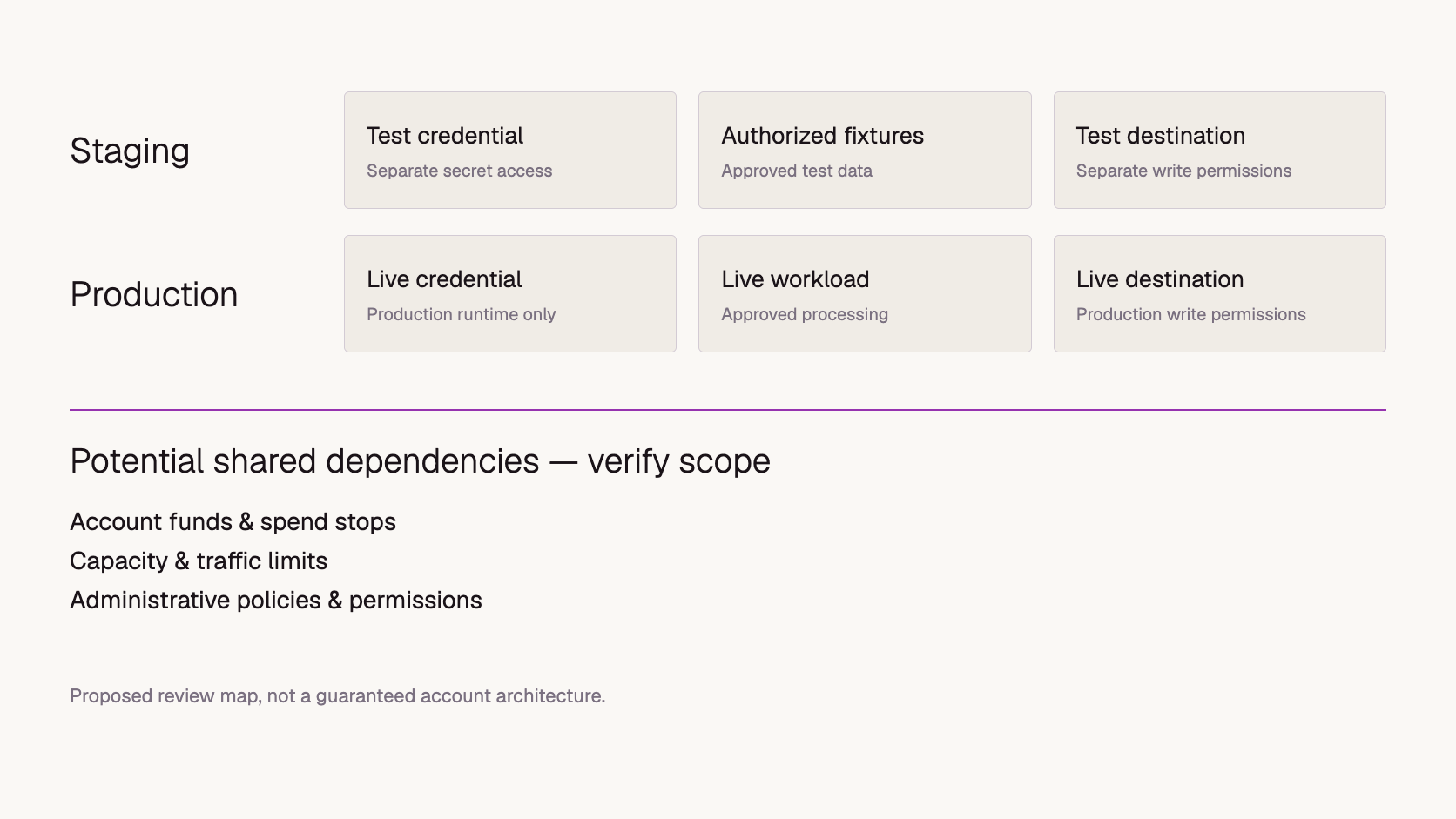
Proposed boundary map. Shared items must be verified for the actual account; the figure does not describe a guaranteed Token360 architecture.
How can you test the boundary without disrupting production?
Start with configuration and permission checks, then run a small authorized test against disposable resources. Verify the expected result and the absence of unintended writes. Avoid proving isolation by exhausting a live account or saturating production capacity. A bounded check establishes only the boundary it exercises, not every failure mode.
This acceptance plan is proposed, not completed. Record the effective configuration and expected outcome before testing. Use mock or disposable targets for intentionally invalid paths, and do not copy production secrets into staging just to see whether they work.
Inspect secret access. Review whether the staging runtime identity can read the production secret. Test a denied lookup only within the approved security test process; never print secret contents.
Check result destinations. Use a unique synthetic marker in an authorized test and verify it appears only in the disposable staging destination. Confirm permissions independently; an absent record alone does not prove an enforced boundary.
Exercise a local stop condition. Stop the test worker or hit a deliberately configured limit in an isolated test setup. Record which component stopped it and what already-submitted work can still finish.
Review shared controls. Document the scope of funds, account stops and capacity. Mark anything undocumented as unverified instead of load-testing the live service to discover it.
Check deployment drift. Compare the running service’s secret reference, endpoint, model and destinations with the reviewed release configuration.
For every check, keep a date, configuration version, expected boundary, observed evidence and reviewer. “The staging request succeeded” does not answer whether staging can access production. Positive functionality and negative access checks answer different questions.
What should move from staging into production?
Promote the reviewed application changes and approved configuration choices, not staging credentials or incidental test state. A successful staging run validates the tested combination under its conditions. Production may have different permissions, data, traffic and account controls, so record those differences and perform a bounded release check before widening use.
For an AI integration, the release record should identify the model ID, endpoint, relevant request settings and the client version. Also include the output destination and permissions that determine what the response can change. These fields help explain why identical prompt text can behave differently after deployment.
Avoid silently replacing a failed staging credential with a production key. That changes the environment boundary instead of resolving the underlying configuration problem. Investigate the failed check, then update the intended staging setup through its normal process.
Plan rollback as a configuration decision too. Restoring a prior application build should not reconnect a test callback to a production store or revive an obsolete secret reference. Keep the last approved environment mapping alongside the release rather than reconstructing it during an incident.
What should a Token360 team confirm before calling the setup isolated?
Confirm each required boundary with account configuration, documented behavior or an explicit service agreement. Separate keys and workspaces are a starting point. Production isolation also depends on application permissions and any shared spending or capacity constraints. Keep unverified items visible and assign an owner to resolve them before relying on the guarantee.
A concise review record can use four columns: the required boundary, the enforcing control, the evidence and the remaining shared dependency. For example, “staging cannot read the production secret” might be supported by deployment identity permissions, while “staging cannot reduce production throughput” requires separate evidence about capacity scope. One does not prove the other.
Where enterprise requirements exceed the available self-service controls, describe the requirement concretely to Token360: the environments, workloads and shared failure condition you need to prevent. Confirm the resulting scope in the applicable agreement. Do not represent a requested capacity arrangement as already active.
Frequently asked questions
Is renaming a key to “staging” enough?
No. A name helps humans understand intended use. The deployment must actually use that key, and the relevant access, spending and resource boundaries must be enforced separately.
Does each workspace have its own independent balance?
Do not assume so. Verify the actual funding scope for the platform and account. Token360’s documented key limits also interact with account-level controls; a workspace name is not proof of reserved funds.
Should staging use the same model as production?
Use the production model and relevant settings when validating production compatibility. A cheaper substitute may be useful for some development tasks, but it does not validate the original model’s behavior. Record what each test actually covers.
Do different API keys guarantee data isolation?
No. Check who can access prompts, stored results, logs and downstream resources. Separate credentials alone do not establish those permissions or erase data copied between environments.


 Guides
 Guides
 Guides