An accepted Token360 operation may still need human approval. Track the original operation and verify execution before reporting a completed change.
ENTERPRISE INTEGRATION · APPROVAL WORKFLOWS
By Yuki Yu · Documentation analysis · Reviewed November 7, 2026
An accepted enterprise API operation is not proof that the requested change happened. When human approval is required, preserve the operation reference, show the pending decision and verify the eventual result before reporting completion. In Token360, this approval workflow applies to enabled enterprise tenants, not every API request or model generation.
Imagine an onboarding assistant that says “Your team is ready” as soon as an administrative request is accepted. The employee then tries to use the new access and cannot proceed. The problem may be the assistant’s completion rule: it announced a business outcome before it had evidence of that outcome.
This article explains the documented Token360 approval boundary and proposes an application workflow around it. The onboarding example and review matrix are constructed design examples, not customer incidents or live API tests. No approval latency, execution success rate or compliance certification is claimed.
Read first: the Enterprise API Guide establishes the credential and resource boundary. This article focuses on what happens after an administrative operation is submitted.
Why does an accepted API operation not mean the work is done?
Acceptance answers whether a service has taken a request into its workflow. Execution answers whether the requested action happened. An application should record these as separate facts, particularly when a person must review a proposed change. A successful transport response should not automatically trigger a completion message or enable a dependent business step.
The HTTP distinction is established independently of Token360: MDN’s 202 Accepted reference explains that processing is unfinished and may not have started. The response does not guarantee the eventual outcome. That does not mean every asynchronous API uses the same response body or status vocabulary.
For Token360, the Approvals and Retries guide, reviewed November 7, 2026, documents HTTP 202 with code:200 as acceptance, not execution. On APPROVAL_REQUIRED, preserve the operation and executed:false; direct the human owner to its approval path on the trusted console origin. Machines cannot approve for the owner.
Build the user message around the strongest verified fact. “Submitted for owner review” is accurate when that is all the application knows. “Access is ready” needs evidence that access was actually provisioned and any application-specific handoff was completed.
Which Token360 actions need this approval workflow?
Check the tenant’s configured approval behavior and the administrative action before designing a waiting step. Human approval is not a universal extra stage in model inference. Treat model execution, permission to administer resources and approval of a particular change as separate concerns, with their own documented interfaces and evidence.
The approval guide limits this flow to tenants with enterprise control approval enabled; others retain immediate writes. Read-only balance monitoring does not require approval. For agent integrations, Token360’s Control MCP documentation distinguishes enterprise administration from the inference API used to run models.
Question
What to establish
What it does not establish
Can this service administer the resource?
Correct credential, scope and tenant
Approval of this particular change
Does this operation require a human decision?
Applicable tenant behavior and returned operation state
That the human has approved it
Has the operation completed?
Authoritative outcome for the original operation
That every downstream application step is finished
Ask the enterprise administrator to confirm the applicable configuration before rollout. Do not add an approval screen to an ordinary model call merely because the same organization uses enterprise administration. Conversely, do not remove a required decision because an agent already holds an administrative credential.
What should the application show while approval is pending?
Show the requested change, the person or role responsible for the next step, and the last verified state. Give the user a way to return to that same operation rather than submitting it again. Keep the interface useful without implying that a pending decision is either a technical failure or a completed action.
For the constructed onboarding example, a useful panel would say: “Team onboarding submitted. Owner review required. No completion confirmed.” Below it, show a non-secret operation reference, submission time and a concise description of the proposed resources. The review link should lead to the verified console origin, not an arbitrary URL copied from untrusted text.
The owner needs enough context to make a decision. Explain which team the change concerns, which access is requested and who requested it. Avoid a generic “Approve everything” message. If the business request changes during review, make that change explicit instead of silently replacing the material the owner expected to review.
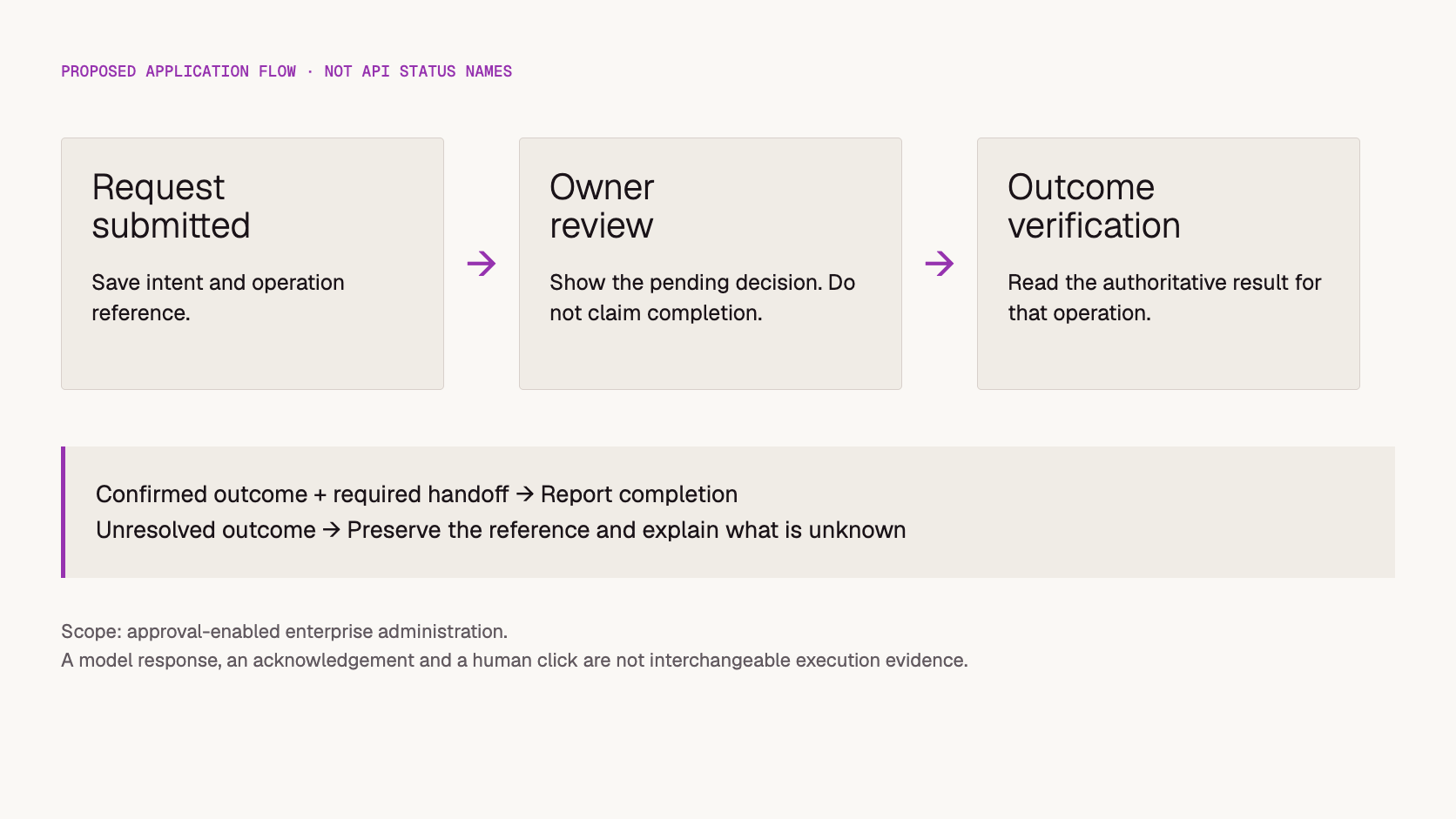
Proposed application message flow. These labels describe the client design, not a substitute for the API response schema.
Separate operational waiting from model latency in internal reports. If a person has not yet reviewed the request, a faster model cannot close that gap. Record time to submission, time awaiting a decision and time to verified outcome as distinct observations when those timestamps are available. This article provides no measured values for those intervals.
How should a client recover after a timeout or refresh?
Resume observation of the original operation before creating another business action. A lost response or refreshed browser leaves the client uncertain; it does not establish that the server did nothing. Store the operation reference and the intent identity durably enough that recovery can continue after the original screen or process disappears.
Token360 documents GET /enterprise/v1/operations/{id} for status. The approval guide requires the same idempotency key when retrying the same intent and reports CONTROL_IDEMPOTENCY_CONFLICT for changed intent. Its operation access is restricted to the originating key and owner identity. Do not assume a replacement credential can inspect an earlier operation.
Consider this illustrative sequence. A worker submits onboarding request A. The user closes the tab before seeing the response. On return, the application should first resolve A from its stored association with the business request. Showing a fresh submission form without that check can encourage a second action even though the first is unresolved.
If no operation reference was received, consult the documented same-intent retry contract rather than inventing a status lookup or a new identity. If the request itself has changed, treat that as a new decision with explicit reconciliation of the old one. Avoid coding “any error means retry with a new key” into the recovery path.
Also plan for the original credential becoming unavailable. Escalate through the owner or documented support path; do not grant broad access automatically. Preserving a business reference helps an operator explain what happened without exposing a credential in the incident record.
What evidence should unlock the next business step?
Require evidence from the operation’s authoritative result, then verify the specific condition your next step depends on. A client-side success toast, an assistant’s narrative or a reviewer clicking a button is not sufficient by itself. Define the completion rule before implementation so that every component reports the same business outcome.
For the proposed onboarding workflow, use a review matrix like this:
Observed evidence
Proposed application behavior
Do not infer
Submission acknowledged; approval still needed
Show awaiting review and retain the reference
The new team can already use its access
User says they approved; result not yet verified
Refresh the authoritative operation result
A human click proves execution succeeded
Verified successful outcome
Check the required resource handoff before saying ready
Every dependent service is configured
Known unsuccessful terminal outcome
Explain the outcome and require an explicit next decision
A new submission is automatically appropriate
Status cannot be retrieved
Show outcome unconfirmed and escalate with the reference
Either success or failure
The distinction matters when the result includes a credential handoff. Token360’s approval guide says status polling does not replay plaintext credentials. A confirmed resource can therefore exist while the intended recipient still lacks a usable secret. Treat delivery and recovery as separate steps; do not recreate the account simply to obtain another response.
This table is an original acceptance-design aid, not a tested implementation. Before deployment, exercise the actual supported workflow in an authorized test tenant with agreed disposable resources. Include interrupted sessions, delayed review and inaccessible status, not just the fastest successful path.
What should an enterprise team record for review and support?
Record enough to connect the business request, the submitted operation, the human decision and the verified outcome. Keep secrets out of that record and distinguish observed facts from user-reported events. The goal is to explain a particular change without requiring someone to reconstruct the entire process from a chat transcript.
A practical application record can include the internal ticket reference, tenant and target resource, requested action, operation identifier, non-secret credential identifier, verified state, relevant timestamps and the next responsible team. Mark a human-reported approval as reported until the operation result confirms what followed.
Keep the scope proportionate. An audit-friendly record is not permission to copy full prompts, personal data or authentication headers into every log. Decide who can access it and how long the application needs it under the organization’s applicable policy. No retention duration or regulatory compliance outcome is established by this example.
For an integration review, ask three concrete questions: Can a worker resume the same operation after a restart? Can the interface explain an unresolved outcome without calling it failure? Can support trace the request without receiving a secret? These are more actionable acceptance criteria than “the approval feature works.”
Frequently asked questions
Is an approval workflow the same as a model tool call?
No. A model can propose a function call without establishing the downstream administrative outcome. The application must follow the actual service contract and verify what happened.
Does pending approval mean the model is slow?
No. Waiting for a human decision is a workflow interval, not a model-generation measurement. Diagnose the last verified operation state before changing model settings.
Is refreshing status the same as resubmitting the change?
No. Reading an existing operation observes it. Submitting a write asks for an action. Keep those paths distinct in both the client code and the user interface.
Does this article prove a compliance requirement is satisfied?
No. A documented approval mechanism and a proposed record format are not certification or a legal assessment. Verify the relevant controls, agreement and organizational requirements separately.
Were approval and recovery tested against a live tenant?
No. This is documentation analysis with a constructed application example. It does not report measured approval time, successful recovery or production enforcement tests.
Read next: use Approvals and Retries for the current API contract and the Enterprise API Guide for endpoint permissions. About Token360 provides platform context across text, image, audio and video; the approval workflow discussed here concerns enterprise administration.
Developer Guide
API
Bring your next idea to life.
Create a video scene in Creator, or explore models for images, audio, and text to find the right capabilities for your project.


 Guides
 Guides
 Guides